Guides
How to Track Inventory Across Multiple Stores: A Practical Guide
Kyndle One Team · 12 September 2026 · 10 min read
Open a second location and the instinct that ran your first shop quietly stops working — sold out here, overstocked there, counts that never match. Here's how to track inventory across multiple stores with one source of truth you can see from anywhere.
Running one shop, you can almost feel your stock. You know what's on the shelf, what's running low, and what hasn't moved in months — often without looking it up. Open a second location, and that instinct quietly stops working. Now a best-seller is sold out in one store while three sit gathering dust in another, a customer is told "we don't have it" when the same item is one branch away, and at month-end your counts never quite add up.
Tracking inventory across multiple stores isn't just "the same thing, but more." It's a genuinely different problem, and the informal habits that worked for one shop actively break at two. The good news: with the right foundations and a single source of truth, multi-store stock becomes something you can see and control from anywhere. This guide walks through exactly how to do it — the principles, the practices, and the common traps.
Why multiple stores make inventory so much harder
It helps to name why this gets hard so fast, because each reason points to part of the solution:
- The same product lives in several places at once. "50 in stock" is meaningless — you need to know 20 here, 25 there, 5 somewhere else.
- Stock moves between locations. Transfers happen constantly, and if they aren't recorded properly, both stores' numbers go wrong at once.
- Each store sells at its own pace. A product that flies in one neighbourhood barely moves in another, so a single reorder rule doesn't fit.
- More people can touch the stock. More staff and more locations mean more chances for uncounted, mis-scanned or missing items.
- You can't be everywhere. You lose the physical, in-the-room sense of your stock, so you have to replace instinct with a system.
With one shop you can feel your stock. With several, you have to be able to see it — from one screen, in real time.
Get the foundations right first
Before any tool or technique, three foundations decide whether multi-store tracking will ever work. Skip these and no software will save you.
1. One shared product catalogue
Every store must sell from the same catalogue, where each product exists once, with one identity. If "Rose Oud 50ml" is entered slightly differently at each branch, you can never add the numbers up. One product, one record, used everywhere.
2. Stock counted per location
Your system has to hold stock by location, not as a single lumped figure. Every product's record should show how many units are at each store, so a total is something you can break down — not a mystery you have to investigate.
3. A single source of truth
There must be one place that holds the real numbers for every store, and everyone works from it. The moment each branch keeps its own separate list, you have several versions of the truth and no way to know which is right. This is the single most important idea in multi-store inventory. It underpins good compliance, too: UAE businesses must keep and retain proper records, and accurate, single-source inventory data helps keep those records defensible.
Every product needs a proper SKU and barcode
A SKU (stock-keeping unit) is a unique code for each distinct product — and once you have more than one store, it stops being optional. A good SKU lets everyone, everywhere, refer to exactly the same item without ambiguity, makes receiving and counting fast, and removes the guesswork that "the black bottle, medium size" invites. Pair each SKU with a scannable barcode and your counts, sales and transfers all get faster and far more accurate. If your products don't have clean, consistent SKUs yet, that's the very first job — everything else is built on it.
How people actually track multi-store stock (and what works)
Broadly, businesses reach for one of three approaches as they grow. Two of them break; the third is the real answer.
| Approach | What it is | Why it breaks (or works) |
|---|---|---|
| Spreadsheets | A shared file with stock per store, updated by hand | Goes stale instantly; two people edit at once; no live link to sales. Fine for one shop, fails at two. |
| Separate POS per store | Each branch runs its own till and its own stock | Each store is accurate alone, but the numbers never roll up. You can't see the whole business or move stock cleanly. |
| Centralised cloud system | One system, stock tracked per location, updated live by every sale | The real answer: one source of truth, live numbers everywhere, transfers and reordering built in. |
The pattern is clear: anything where each store keeps its own separate numbers will eventually fail, because there's no reliable way to combine them. A centralised, cloud-based system — where a sale in any store updates the shared record instantly — is what makes multi-store inventory genuinely trackable.
The core practices that keep it accurate
With the foundations and the right kind of system in place, these are the habits that keep your numbers trustworthy across every location.
Track stock per location, in real time
Every sale should reduce stock at the store where it happened, the moment it happens. When your inventory updates live from a point-of-sale system that adjusts stock as you sell, your numbers are always current — you're never looking at yesterday's picture and guessing.
Record transfers properly (this is where numbers go wrong)
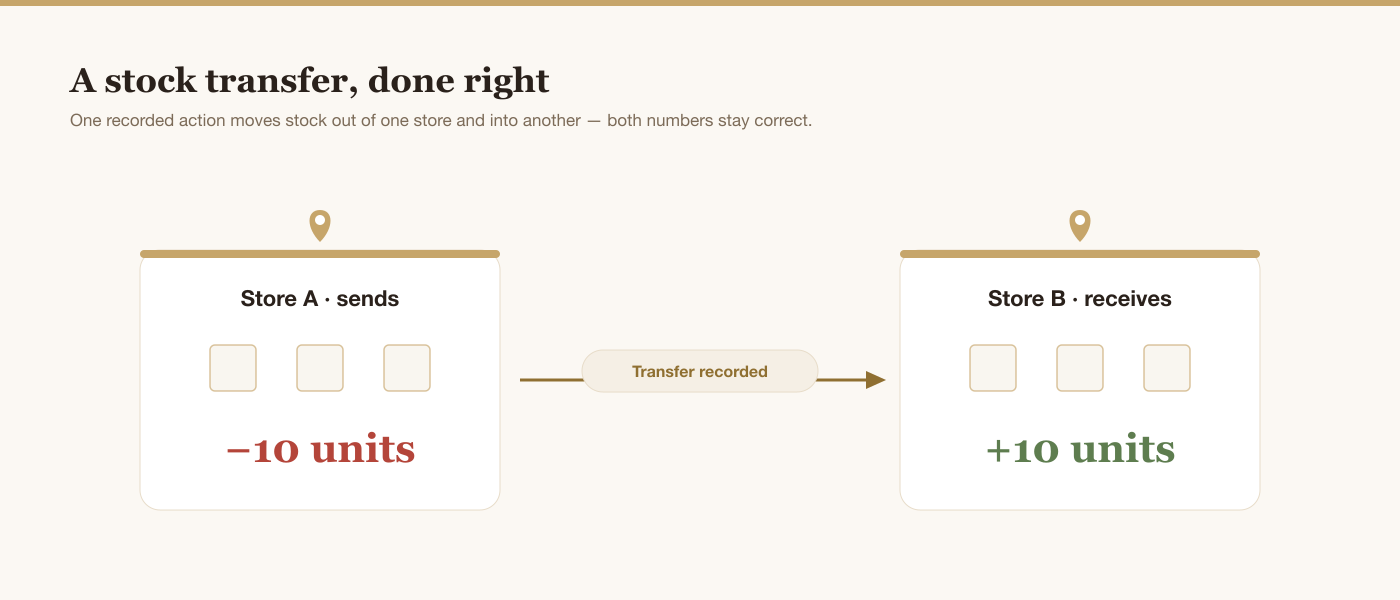
Moving stock between branches is the most common source of multi-store errors. A transfer must do two things at once: reduce the sending store and increase the receiving store, as one recorded action. Treat it like a shipment — log what left, confirm what arrived, and investigate any difference. We'll come back to this below, because getting it right prevents most of the discrepancies businesses blame on "the system."
Set reorder points per branch
Because each store sells at its own pace, a single reorder rule leaves you overstocked in one place and empty in another. Set a minimum level per product, per store, based on how fast that item actually sells there, and let the system flag what to reorder for each location. This is how you stop the "sold out here, overstocked there" problem.
Do regular cycle counts, not one big annual count
Counting the entire business once a year is stressful, inaccurate and always too late. Instead, run cycle counts — count a small section of stock regularly (say a category a week per store) so counting becomes routine, errors surface early, and your numbers stay close to reality all year. Your fast-moving and high-value items deserve the most frequent counts, while slow, low-value stock can be checked less often. Spread across the year, the total effort is smaller than a single annual count — and your numbers are trustworthy every day in between, not just once.
Control who can change stock
More locations mean more hands on your inventory, so decide who can do what. A cashier can sell; only certain roles should be able to adjust stock, approve transfers or write off damaged goods. Clear permissions — and a record of who changed what — are how you find the cause when a count is off, and how you deter the small, quiet losses that add up.
Watch the whole business from one dashboard
The payoff of a single source of truth is a single view. You should be able to open one screen and see stock across every store, what's low where, which dead stock is quietly tying up your cash, and where to move it — without calling each branch. That overview is the difference between reacting to problems and getting ahead of them.
Stock transfers, done right
Because transfers cause most multi-store discrepancies, they deserve their own short playbook:
- Raise the transfer in the system before anything physically moves, listing exactly what and how much.
- The sending store's stock goes down when the goods leave — recorded, not assumed.
- The receiving store confirms what actually arrived, and its stock goes up by that amount.
- Any difference is flagged and investigated immediately, while it's still traceable.
Done this way, stock is never in two places or no place; it's always accounted for, and a shortfall is caught the same day rather than discovered months later with no trail. Treat every transfer like a small delivery between businesses and your numbers stay clean.
Common mistakes to avoid
- Letting each store keep its own list. Separate numbers can never be reliably combined.
- One reorder level for all stores. Different locations sell differently; treat them that way.
- Informal transfers. "I moved a few over" with no record is where stock quietly disappears.
- Only counting once a year. By then errors are huge and untraceable.
- Everyone can adjust stock. Without roles and a change history, you can't find what went wrong.
- Inventory disconnected from sales. If selling something doesn't update stock automatically, your numbers are wrong the moment the day starts.
A simple system you can put in place
If you're setting this up from scratch, here's a sensible order:
- Clean your catalogue: one record per product, a proper SKU and barcode for each.
- Adopt one centralised system that tracks stock per location and updates live from every sale.
- Do an accurate opening count at each store so you start from truth.
- Set per-store reorder points for your important items.
- Make transfers a recorded, two-sided action — out of one store, into another.
- Schedule cycle counts and set staff permissions.
Do those six things and you'll have replaced instinct with a system that scales to as many stores as you open.
What to look for in a multi-store inventory system
If you're choosing software to make this work, these are the capabilities that actually matter for more than one location — use it as a checklist:
- Stock tracked per location, not as a single combined figure, so you always know what's where.
- Live updates from sales at every store, so numbers are never stale.
- Built-in transfers that move stock out of one branch and into another as one recorded action.
- Per-store reorder points and low-stock alerts for each location.
- One consolidated dashboard covering every store at a glance.
- Staff roles and an activity log, so you control who can adjust stock and can trace changes.
- Cloud-based access, so you can check any store from anywhere — not just from a back-office PC.
- Barcode and SKU support to make receiving, counting and transfers fast and accurate.
A system that ticks these boxes turns multi-store stock from a guessing game into something you manage on purpose. Just as importantly, weigh the real cost of keeping inventory and sales in separate tools — if selling an item doesn't automatically reduce its stock at that store, you'll be reconciling by hand forever.
One catalogue, every branch
Kyndle One tracks stock per branch in real time, with built-in transfers and one dashboard for your whole business.
Request a demo →Where Kyndle One fits
Kyndle One is built for exactly this. It gives every store one shared product catalogue, tracks stock per branch in real time, and updates those numbers automatically with every sale — so there's a single source of truth for your whole business. Stock transfers between branches are a proper two-sided action that moves inventory out of one location and into another with a full record. You can set reorder points per store, run counts, and control who's allowed to adjust stock with staff roles and an activity log. And it all rolls up into one dashboard, so you can see stock across every location — what's low, what's overstocked, and what to move — from a single screen, wherever you are.
It also means your inventory, sales and accounting software that stays in sync with every sale are the same connected data, so nothing has to be re-entered as you grow from one store to several.
The bottom line
Tracking inventory across multiple stores comes down to one idea: a single source of truth, with stock counted per location and updated live. Give every product a clean SKU, keep one shared catalogue, record transfers as a proper two-sided action, set reorder points per store, and count in small regular cycles rather than one yearly scramble. Do that, and the chaos of multi-store stock — the sold-out-here, overstocked-there, numbers-never-match feeling — is replaced by a clear picture you can act on from anywhere. That clarity is what lets you keep opening stores without losing control of what's on the shelves.
Related guides
Frequently asked questions
How do you track inventory across multiple stores?+
Keep one shared product catalogue, track stock per location in a single centralised system, and update those numbers live from every sale. Give each product a clean SKU and barcode, record transfers as a two-sided action (out of one store, into another), set reorder points per store, and count in small regular cycles. The key principle is a single source of truth rather than each store keeping its own list.
Why shouldn't each store keep its own stock list?+
Because separate lists can never be reliably combined. If each branch tracks stock independently, you have several versions of the truth, no live total, and no clean way to move stock between locations. A single centralised system that all stores share is what makes multi-store inventory trackable.
What's the best way to handle stock transfers between branches?+
Treat every transfer like a shipment: raise it in the system first, reduce the sending store's stock when the goods leave, have the receiving store confirm what actually arrived, and investigate any difference immediately. Recording it as one two-sided action keeps both stores' numbers correct and catches shortfalls the same day.
How often should I count stock in each store?+
Use cycle counts rather than one big annual count — count a small section regularly (for example a category a week per store), counting your fast-moving and high-value items most often. Spread across the year the total effort is smaller, errors surface early, and your numbers stay accurate all year instead of only once.
Do I need special software to track inventory across stores?+
For more than one location, effectively yes. Spreadsheets go stale and separate tills never roll up. A centralised, cloud-based system that tracks stock per location, updates live from sales, and has built-in transfers and per-store reorder points is what makes it manageable — ideally one where inventory, sales and accounting are the same connected data.
Run your business smarter with Kyndle
Point of sale, inventory, accounting and AI insights in one calm place.
Request a demo